Saturday, January 17
CSS Tricks

CSS Grid in IE: CSS Grid and the New Autoprefixer

In Part 1 of this series, I debunked a few misconceptions that many people have around the Internet Explorer (IE) implementation of CSS grid. This article builds on that knowledge. It would be best to go back and read that article first if you haven’t already. Today I’m going to be tackling the biggest misconception of all: that utilizing the IE implementation of CSS grid is extremely difficult. You can easily use CSS grid in IE right now without having to give it any sort of crappy fallback layout. It really isn't that hard. Article Series: Debunking Common IE Grid Misconceptions CSS Grid and the new Autoprefixer (This Post) Faking an auto-placement grid with gaps (Coming Soon!) Giving IE a crappy fallback layout is a bit of a tough sell to clients. It...
Web Tricks

I Used The Web For A Day With Just A Keyboard

I Used The Web For A Day With Just A KeyboardI Used The Web For A Day With Just A Keyboard Chris Ashton 2018-07-04T13:30:05+02:00 2018-07-10T16:18:00+00:00 This article is part of a series in which I attempt to use the web under various constraints, representing a given demographic of user. I hope to raise the profile of difficulties faced by real people, which are avoidable if we design and develop in a way that is sympathetic to their needs. Last time, I used the web for a day without JavaScript. Today, I forced myself to navigate the web using just my keyboard. Who Uses The Keyboard To Navigate? Broadly, there are three types of keyboard users: Mobility-i...
99 Things You Can Do with Google Tag Manager
Google Tag Manager

99 Things You Can Do with Google Tag Manager

Ah… Good old clickbait. Add a huge number to the title of the popular topic and you’re good to go. Oh, I almost forgot to mention that #54 will shock you and you won’t believe what is in the #72! Just kidding. All the entries in the list are definitely worth checking out. Pinky promise. Unless you lived under a rock for the last 5 years, you probably have heard at least something about Google Tag Manager. But if that name still does not ring a bell, here’s a quick introduction: GTM is a free software from Google that allows you to install various types of code (tags) to your website, like Google Analytics tracking code, Google Analytics event codes, Google Ads conversion scripts, etc. But that’s just the tip of the iceberg as there are many more things you can do with Google Tag Manager. ...
Clearfix: A Lesson in Web Development Evolution
CSS Tricks

Clearfix: A Lesson in Web Development Evolution

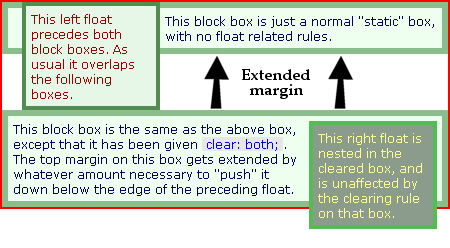
The web community has, for the most part, been a spectacularly open place. As such, a lot of the best development techniques happen right out in the open, on blogs and in forums, evolving as they’re passed around and improved. I thought it might be fun (and fascinating) to actually follow this creative exchange all the way through. To take a look at a popular CSS trick, the clearfix, and find out exactly how a web design technique comes to be. The clearfix, for those unaware, is a CSS hack that solves a persistent bug that occurs when two floated elements are stacked next to each other. When elements are aligned this way, the parent container ends up with a height of 0, and it can easily wreck havoc on a layout. All you might be trying to do is position a sidebar to the left of your main ...
Web Tricks

CSS Grid Level 2: Here Comes Subgrid

CSS Grid Level 2: Here Comes SubgridCSS Grid Level 2: Here Comes Subgrid Rachel Andrew 2018-07-03T13:00:47+02:00 2018-07-10T16:18:00+00:00 We are now over a year on from CSS Grid Layout landing in the majority of our browsers, and the CSS Working Group are already working on Level 2 of the specification. In this article, I’m going to explain what is currently part of the Working and Editor’s Draft of that spec. Note that everything here is subject to change, and none of it currently works in browsers. Take this as a peek into the process, I’m sure I’ll be writing more practical pieces as we start to see implementations take shape. CSS Specification Levels The...
The Best Image Compression Tools for the Web
Web Tricks

The Best Image Compression Tools for the Web

It’s no real secret that the size of web pages is increasing. We’re adding more and more assets, slowing down sites, and ruining user experience. But even though we’ve identified the problem, we still won’t take responsibility. Instead, we lean on coders to streamline their output—we ask then to drop useful libraries like jQuery, just because it saves us 80kb. Meanwhile, we’re designing layouts with 1mb images. If we’re serious about making our sites fast (and we should be), if we’re serious about improving UX (and we should be), if we’re serious about boosting SEO (and we should be), then we need to do something about the real culprit: images. Images are by far the biggest bloat on sites. And due to the type of images they suit, JPGs are the biggest bloat on the web. Today we’re going to...
CSS Tricks

Writing Good Support Requests

My take on trying to be helpful to a support staff. One bit is just as relevant for learning development: Writing out a ticket will help you figure out the problem. Sometimes when you have to take a second to collect your thoughts and explain something, the problem will become clear and maybe even the solution. Oftentimes, a bug is a bug and just needs to be fixed — but sometimes your support ticket might actually be something you can sort out for yourself and writing things out might be the first step toward that. You know what they say, the best way to learn something is to teach it. Just replace "ticket" with "forum topic" or whatever, on something like Spectrum. Direct Link to Article — PermalinkThe post Writing Good Support Requests appeared first on CSS-Tricks. Source: CSS-tr...
Improving Performance Perception: On-demand Image Resizing
PHP

Improving Performance Perception: On-demand Image Resizing

Over a series of articles, we've been building a sample application --- a multi-image gallery blog --- for performance benchmarking and optimizations. At this point, our application serves the same image regardless of the resolution and screen size it's being served in. In this tutorial, we'll modify it to serve a resized version depending on display size. Objective There are two stages to this improvement. We need to make all images responsive wherever this might be useful. One place is the thumbnails on the home page and in the gallery pages, and another is the full-size image when an individual image is clicked in the gallery. We need to add resizing-logic to our app. The point is to generate a resized image on the fly as it's demanded. This will keep non-popular images from polluting o...
CSS Tricks

One-Offs

There is this sentiment that you don't design the homepage of a site first. For most sites, it's an anomaly. It's unlike any other page and not something to base the patterns you use for the rest of the site or help inform other pages. You might call it a one-off.1 One-offs are OK! A world without one-offs is very boring. But a site chock-full of one-offs leads to familiar problems: inconsistency and non-reusable CSS that leads to bloating and maintainers that don't really know what's used and what isn't. What are we to do? Brad Frost thought about this recently with his article Where to put one-off components?: It’s quite likely that individual applications contain components that fit the very real needs of a specific application (think calculators, holiday-season parallax hero units, ...
Web Tricks

Getting Started with JavaScript Object

An object is a type of data in JavaScript. It's the only value you can pass around as variables besides primitives. For this reason, objects are really important in JavaScript. What are objects An object in JavaScript is a type of data that contains key-value pairs. You can create objects by writing these key-value pairs within curly braces. If you intend to create multiple key-value pairs, you need to separate each pair with commas, like this: const anObject = { key1: 'value1', key2: 'value2', key3: 'value3' // ... } Each key gives you a reference to a value. If you imagine an English dictionary, the keys are the words while the values are the definition of each word. const dictionary = { dream: "a series of thoughts, images, and sensations occurring in a person's mind during sl...
CSS Grid in IE: Debunking Common IE Grid Misconceptions
CSS Tricks

CSS Grid in IE: Debunking Common IE Grid Misconceptions

This is the first in a three-part series all about how to use CSS grid in a way that will work not only in modern browsers but also in Internet Explorer (IE). Imagine writing CSS grid code without having to write a fallback layout! Many of us think that this is some far off future that is many years away. If the only thing holding you back from that reality is IE11 (check caniuse.com), then you’re in luck! That day is today! Or at least it will be when you finish reading this series. ? Article Series: Debunking Common IE Grid Misconceptions (This Post) CSS Grid and the new Autoprefixer (Coming Soon!) Faking an auto-placement grid with gaps (Coming Soon!) To start off, this first part is going to debunk some common misconceptions around IE11’s native gri...
Web Tricks

Building Mobile Apps With Capacitor And Vue.js

Building Mobile Apps With Capacitor And Vue.jsBuilding Mobile Apps With Capacitor And Vue.js Ahmed Bouchefra 2018-07-02T14:00:41+02:00 2018-07-10T16:18:00+00:00 Recently, the Ionic team announced an open-source spiritual successor to Apache Cordova and Adobe PhoneGap, called Capacitor. Capacitor allows you to build an application with modern web technologies and run it everywhere, from web browsers to native mobile devices (Android and iOS) and even desktop platforms via Electron — the popular GitHub platform for building cross-platform desktop apps with Node.js and front-end web technologies. Ionic — the most popular hybrid mobile framework — currently runs o...
Web Tricks

​Build a web traffic monitor with Python

In today’s tech world, it is important to know where the traffic on your website comes from because it helps content creators and website owners understand their visitors better. Website owners can further use this information to improve their website, render better advertisements or generally improve their content based on this data. In this tutorial, we will build a simple website and a traffic monitor, the traffic monitor will display details about visitors on the website. For every visitor, there will multiple columns such as time of visit, continent, country, city, operating system, browser, and pages visited. Here is a display of what the final application will look like: From the image above, we can see an incognito window to the left and the traffic monitor dashboard window to the...
How to Run a Successful Design Critique
Web Tricks

How to Run a Successful Design Critique

The quality of critique sessions is a clear indicator of how well the creative process is being managed. When a design critique goes well, it can create more ideas on how to solve the problem at hand or help designers pick between a multitude of great solutions. But when a design critique goes wrong, it becomes a huge source of frustration for designers; designers who have been burned by insulting or unfocused critiques stop going to the sessions. If you want to run design critique sessions in your organization, you should do it right. What is a Design Critique? Critique sessions are a meeting during which designers share their unfinished work with colleagues. The purpose of a critique is to make the design better. While critique session might sound like a brainstorm session, there’s a ma...
How to Boost Your Server Performance with Varnish
PHP

How to Boost Your Server Performance with Varnish

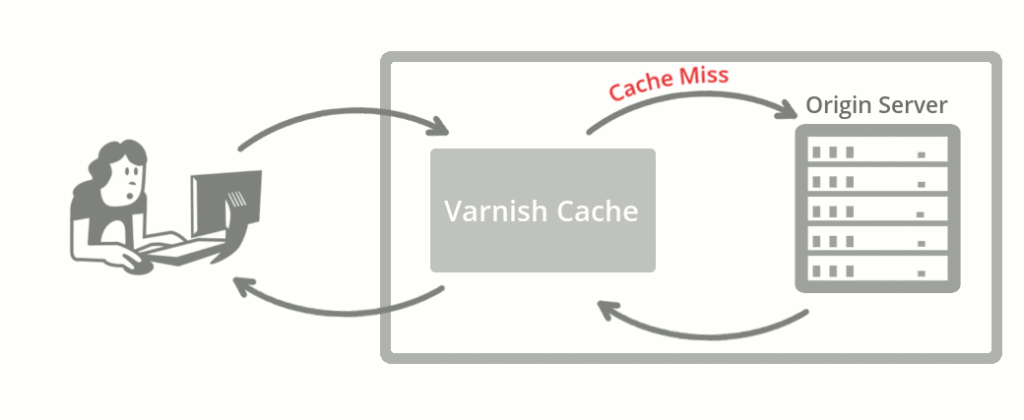
Varnish Cache is an HTTP accelerator and reverse proxy developed by Danish consultant and FreeBSD core developer Poul-Henning Kamp, along with other developers at Norwegian Linpro AS. It was released in 2006. According to Pingdom.com, a company focused on web performance, in 2012 Varnish was already famous among the world's top websites for its capacity to speed up web delivery, and it was being used by sites such as Wired, SlideShare, Zappos, SoundCloud, Weather.com, Business Insider, Answers.com, Urban Dictionary, MacRumors, DynDNS, OpenDNS, Lonely Planet, Technorati, ThinkGeek and Economist.com. It is licensed under a two-clause BSD license. Varnish has a premium tier, Varnish Plus, focused on enterprise customers, which offers some extra features, modules, and support. Although there a...